How to spot phishing emails
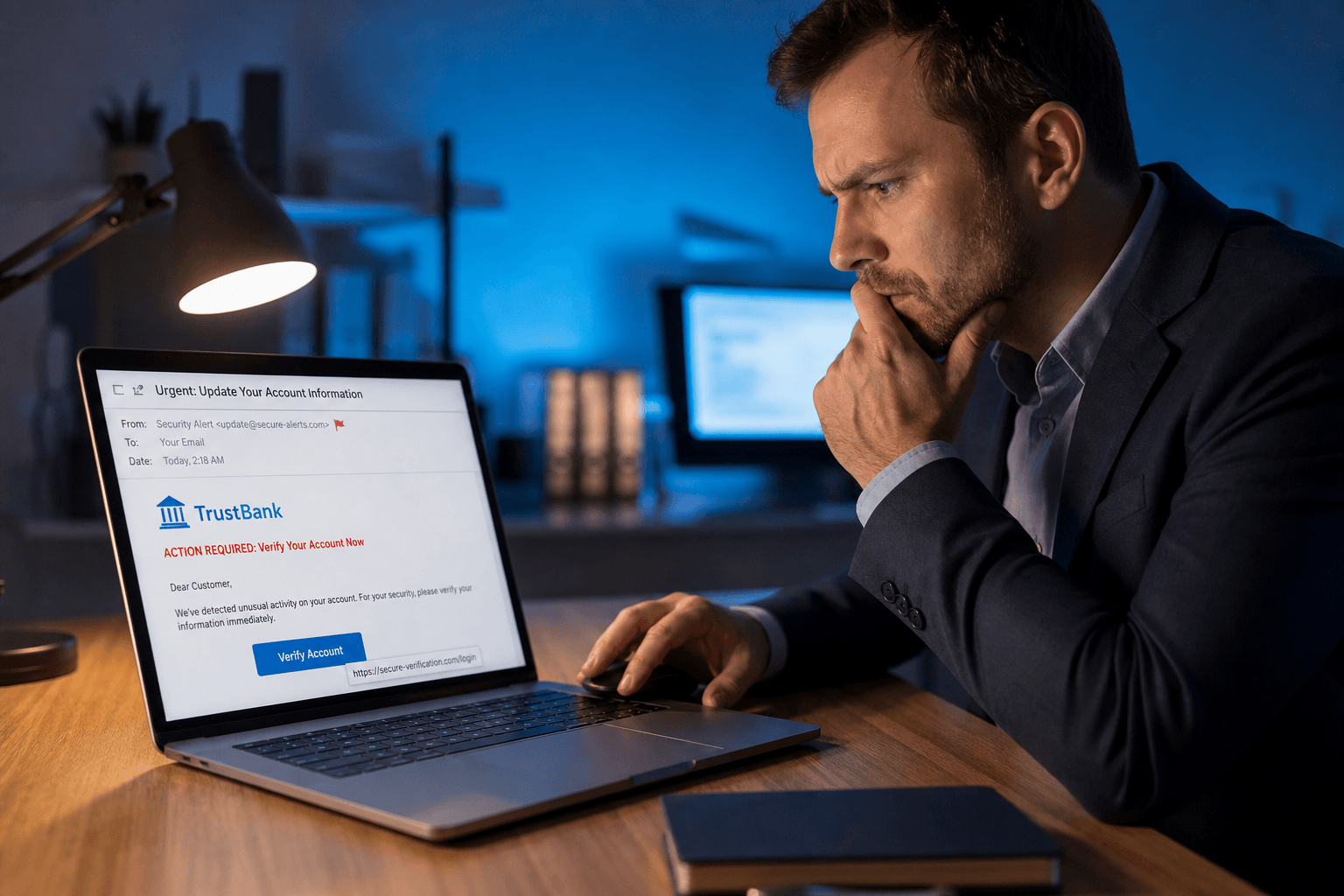 Phishing is the original sin of email security — and it's still working because it's cheap to send and expensive to defend against human reflex. One convincing fake login page or "invoice attached" message can compromise an entire organization.
You don't need a cybersecurity certification to get dramatically safer. You need a repeatable mental checklist. Here's how to spot phishing in the wild — and what to do when something feels off.
What phishing actually is
Phishing is social engineering delivered through email: someone impersonates a person or brand you trust to steal credentials, money, or data. It comes in a few flavours worth knowing by name:
Bulk phishing — mass-sent, low-personalization ("Your Apple ID is locked").
Spear phishing — targeted at you specifically, referencing your role, company, or recent activity.
BEC / CEO fraud — impersonates an executive or finance contact to authorize wire transfers or change payment details. This costs businesses billions annually.
QR code phishing — a rising variant: an image of a QR code bypasses link scanners entirely because text-based filters can't read it.
Red flags in the sender
Look-alike domains. The eye reads fast: support@app1e.com instead of Apple, paypa1.com instead of PayPal, acct-verify-bank.net instead of your bank's actual domain. On mobile, many clients only show the display name — tap to reveal the actual address.
Freemail impersonating enterprise. "Microsoft Security Team" sent from a Hotmail or Gmail address. Legitimate enterprise alerts come from authenticated organizational domains.
Display name spoofing. The visible name is "Jane Smith (Finance)" but the address is jane.smith.fin@randomdomain.xyz. Always expand the sender to see the full address before acting on financial or access requests.
Red flags in the content
Engineered urgency. "Your account will be suspended in 24 hours." "Immediate action required." This is deliberate — panic overrides careful thinking. Legitimate services escalate through multiple touchpoints before locking anything.
Generic greetings from personalized services. "Dear Customer" from a bank that greets you by name in every statement. "Dear User" from a platform that knows your username.
Mismatched link text and destination. The link says secure.yourbank.com but hovering reveals yourbank-login.ru. On desktop, always hover. On mobile, long-press to preview before tapping.
Dangerous attachment types. .exe, .zip inside invoices, password-protected archives (the password is in the email — designed to bypass scanning), or anything called invoice_final.pdf.exe. The double extension is a classic attack.
Fake invoice fraud. One of the most common business attacks: a PDF invoice with updated bank details, usually timed to coincide with a real expected payment. Always verify changed payment details with the supplier by phone — not by replying to the email.
Before you click anything
Hover the link first. The displayed text is irrelevant. The destination URL is what matters. If it doesn't match the sender's known domain, don't click.
Never use links in the email to log in. Open a fresh browser tab and navigate to the service directly. If something genuinely needs your attention, it'll be visible in your account dashboard.
Verify financial or access requests out-of-band. Wire transfer request from "your CEO"? Call them. Bank asking you to re-verify? Call the number on the back of your card — not the one in the email. This one rule prevents most BEC fraud.
If you already clicked
Time matters. If you entered credentials on a page that turned out to be fake:
1. Change the password immediately on the real service — from a trusted device, navigated to directly.
2. Enable MFA if it wasn't already on.
3. Check for active sessions — most services show logged-in devices under security settings. Revoke anything unfamiliar.
4. If it was a work account, notify IT immediately — contain the incident before it spreads.
5. If banking or financial credentials were involved, call your bank and consider a fraud alert on your credit file.
An organized inbox makes phishing harder to miss
Phishing thrives in chaos. When invoices, receipts, newsletters, alerts, and personal messages arrive as one undifferentiated flood, every message feels equally plausible. That's the attacker's advantage — you're already overwhelmed, so you scan and click without reading carefully.
Faraday automatically separates these streams — real correspondence surfaces clearly, bulk senders are categorized, and the inbox stays organized without effort. When a suspicious "invoice" appears in a thread where you'd normally see receipts from known vendors, it stands out instead of blending in. Combined with AES-256 encryption and an architecture built around privacy, the environment itself is more defensible.
Phishing wins when you're rushing through noise. Slow down, verify the sender, and you win almost every time.